The Best Fluffy Pancakes recipe you will fall in love with. Full of tips and tricks to help you make the best pancakes.

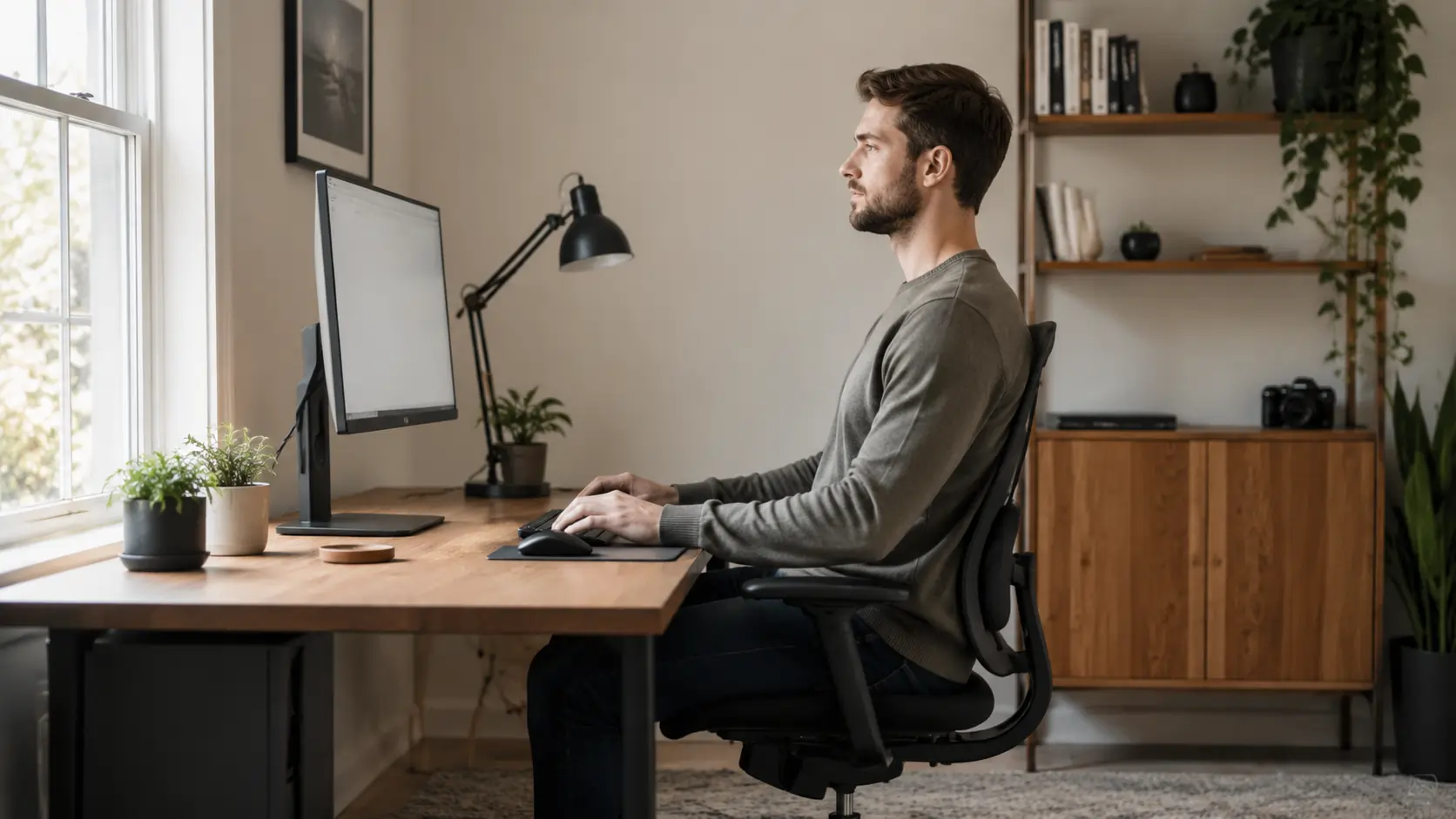
I started getting lower back pain at 28. At first, it seemed random. Then it became obvious the discomfort always got worse after long workdays. A doctor explained that the problem was not age. It was how I sit at a desk for hours every day. A few small changes made a bigger difference than expected, and most of them cost nothing.
Back pain from desk work is extremely common. Long hours in front of screens change how people sit, move, and hold tension in the body. The surprising part is that the solution is usually not one perfect chair or one “correct” posture. Instead, it comes from combining better positioning with regular movement throughout the day.
This guide explains the practical changes that help reduce strain while working at a computer. The focus is not on complicated medical advice. It is about making everyday desk work more comfortable and sustainable.
Key Takeaways
- Sitting perfectly still causes more problems than slightly imperfect posture
- Chair height affects nearly every other part of desk ergonomics
- Monitor position can reduce neck and upper back tension
- Proper keyboard and mouse placement helps shoulders and wrists stay relaxed
- Lumbar support matters, even if it comes from a rolled towel
- Standing and moving every 30–45 minutes is one of the most important habits
- Small stretches throughout the day often work better than long workouts afterward
The Posture Myth: Perfect Posture Is Not the Goal
Many people believe there is one ideal way to sit all day. In reality, the body does not like staying in any single position for hours.
Even “perfect posture” becomes uncomfortable when held too long.
That is why ergonomics experts focus more on movement and variation than on forcing the spine into one exact shape.
Why Static Sitting Causes Pain
When people stay in the same position too long, muscles tighten and joints stiffen. Blood flow decreases slightly, and certain muscles begin doing more work than others.
This creates tension in areas like:
- Lower back
- Neck
- Shoulders
- Hips
The problem gets worse during focused work because many people stop noticing their posture completely.
What Ergonomics Actually Means
Ergonomics is not about sitting like a statue. It is about creating a workspace that allows the body to stay relaxed while changing positions naturally.
Good ergonomics usually means:
- Shoulders stay loose
- Wrists remain straight
- Eyes look forward comfortably
- Feet stay supported
- Movement happens often
That flexibility matters more than trying to “sit perfectly.”
The Real Goal: Reduce Strain
A helpful desk setup reduces unnecessary stress on the body.
If the chair is too low, shoulders rise upward. If the monitor is too low, the neck bends forward constantly. If the mouse sits too far away, the shoulder tightens all day.
Small positioning issues add up over months and years.
That is why simple adjustments can create noticeable relief surprisingly quickly.
Chair Height: The Starting Point for Everything Else
Before adjusting monitors or keyboards, start with chair height.
This is the foundation of the entire workstation.
If the chair height is wrong, every other part of the setup becomes harder to position correctly.
How High Should the Chair Be?
The general goal is simple:
- Feet flat on the floor
- Knees around 90 degrees
- Thighs roughly parallel to the ground
This position helps distribute body weight more evenly and reduces pressure on the lower back.
The Elbow Test
One of the easiest ways to check desk ergonomics is the elbow test.
Sit naturally with shoulders relaxed and arms hanging comfortably.
Your elbows should line up roughly with desk height.
If the desk sits too high, shoulders tense upward. If the desk sits too low, the upper body leans forward.
Both positions increase fatigue over time.
What If Your Feet Do Not Reach the Floor?
This happens often, especially when people raise the chair to match desk height.
In that case, use a footrest.
A footrest keeps pressure off the thighs and helps maintain circulation in the legs.
Even a sturdy box or stack of books can work temporarily.
Why Seat Depth Matters Too
Many chairs are too deep for shorter users.
If the seat presses into the back of the knees, circulation may become uncomfortable.
Ideally, there should be a small gap between the seat edge and the back of the knees.
That allows the legs to stay relaxed during long work sessions.
Monitor Height and Distance Change Neck Position More Than People Realize
Monitor placement strongly affects neck and upper back tension.
When screens are too low, people slowly lean forward without noticing.
Over time, this creates the classic “forward head posture” common in office workers.
Where the Top of the Screen Should Be
The top edge of the monitor should sit at or slightly below eye level.
This keeps the neck in a more neutral position.
People who wear progressive glasses sometimes prefer the screen slightly lower to reduce neck strain.
Ideal Viewing Distance
A monitor should usually sit around an arm’s length away.
For most setups, that means about 50–70 cm.
If the screen sits too close:
- Eyes tire faster
- Neck tension increases
- People lean backward awkwardly
If it sits too far:
- Squinting increases
- Forward leaning becomes more common
Laptop Users Need Extra Attention
Laptop screens are often too low by default.
That forces the head downward all day.
A simple laptop stand or even a stack of books can help raise the screen closer to eye level.
Then use an external keyboard and mouse if possible.
This small change often helps neck and shoulder comfort immediately.
Two Monitor Setups
Dual monitors look productive, but positioning matters.
If one screen is used most of the time, place it directly in front of the body. The second screen can sit slightly to the side.
If both screens are used equally, center them together so the neck rotates evenly.
Otherwise, constant twisting creates uneven tension over time.
Keyboard and Mouse Position Matter More Than Expensive Accessories
Many people focus on buying ergonomic gadgets before adjusting the basics.
In reality, simple keyboard and mouse positioning solves many comfort problems.
Wrists Should Stay Straight
When typing, wrists should stay relatively neutral.
They should not bend sharply upward or downward.
Straight wrists reduce pressure on tendons and nerves around the wrist and forearm.
Keep the Mouse Close
A mouse placed too far away forces the shoulder outward all day.
This creates tension in the upper back and neck.
The mouse should stay:
- Close to the keyboard
- On the same height level
- Easy to reach without stretching
That relaxed arm position matters more than buying an expensive mouse immediately.
Are Wrist Rests Helpful?
Wrist rests can help, but they are often misunderstood.
The goal is not to press wrists into the pad while typing. Instead, the rest supports the palms during pauses.
Constant pressure on the wrists may actually increase irritation.
Soft support works best when used lightly.
Mechanical vs Standard Keyboards
Some people prefer mechanical keyboards because they reduce finger strain during long typing sessions.
Others find quieter low-profile keyboards more comfortable.
The best option usually depends on typing style and desk height rather than marketing claims.
Lower Back Support: Why Lumbar Support Matters
The lower spine naturally curves inward slightly.
Lumbar support helps maintain that natural curve instead of flattening it.
Without support, many people gradually slump forward as the day continues.
What Proper Lumbar Support Feels Like
Good lumbar support should feel gentle, not aggressive.
The goal is support, not forcing the spine into an exaggerated position.
If the support pushes too hard, discomfort often increases instead of improving.
The Rolled Towel Fix
A rolled towel works surprisingly well.
Place it behind the lower back where the spine curves inward naturally.
This inexpensive fix helps many people immediately feel more supported while they sit at a desk for long periods.
Are Expensive Ergonomic Chairs Worth It?
For people working 8+ hours daily, a high-quality ergonomic chair can absolutely help.
Brands like Herman Miller and Steelcase are popular because they allow:
- Better adjustment
- Dynamic movement
- Improved lumbar support
However, expensive chairs still require good habits.
Even the best chair cannot fully compensate for staying still all day.
The Movement Rule Is More Important Than Any Chair
This is the part many people underestimate.
The best ergonomic setup still cannot replace movement.
The body simply works better when positions change regularly.
How Often Should You Move?
A practical goal is standing or changing position every 30–45 minutes.
That does not mean taking a long break every time.
Even small movement helps:
- Standing briefly
- Stretching arms
- Walking for one minute
- Rolling shoulders
- Adjusting posture
These micro-breaks reduce stiffness surprisingly effectively.
Why Movement Helps So Much
Movement improves circulation and changes muscle activity.
When people stay frozen in one posture, certain muscles become overloaded.
Changing position distributes effort more evenly throughout the body.
That is why small movements often matter more than “perfect posture.”
Standing Desks: Helpful or Overrated?
Standing desks can help, but only if people actually alternate positions.
Standing motionless all day creates its own problems:
- Foot fatigue
- Knee strain
- Lower back tension
The best approach is usually alternating between sitting and standing.
That variation is what makes the biggest difference.
Walking During Calls Helps
One easy habit is standing or walking during phone calls.
This creates natural movement without interrupting productivity.
Many people find their backs feel noticeably better by the end of the day after adding this one routine.
Desk Stretches That Actually Help
Many office stretches feel generic and ineffective.
The most useful stretches target the muscles that tighten most during prolonged sitting.
These stretches are simple and do not require gym equipment.
Hip Flexor Stretch
Hip flexors shorten when sitting for long periods.
Tight hip flexors can increase tension in the lower back.
How to Do It
- Step one foot forward into a lunge position
- Keep the torso upright
- Gently shift weight forward
- Hold for 20–30 seconds
The stretch should feel mild, not painful.
Thoracic Rotation
Mid-back stiffness becomes common during computer work.
Thoracic rotation helps restore movement through the upper spine.
Simple Seated Rotation
Sit upright and rotate gently toward one side while keeping hips stable.
Hold briefly, then switch sides.
This movement can reduce stiffness between the shoulders.
Chin Tuck Exercise
Forward head posture often develops during screen work.
The chin tuck helps retrain neck alignment gently.
How to Perform It
Pull the chin backward slightly as if making a “double chin.”
Do not tilt the head downward.
Hold briefly and repeat several times.
This small movement helps activate muscles that support better neck positioning.
Lighting and Screen Position Affect Posture Too
Poor lighting changes how people position their bodies.
For example, glare on the screen often causes:
- Leaning forward
- Head tilting
- Squinting
That tension eventually affects the neck and upper back.
Reduce Screen Glare
Natural light works best when it comes from the side rather than directly behind the screen.
Adjust blinds or curtains if sunlight creates reflections.
Match Screen Brightness to the Room
An overly bright screen in a dark room strains the eyes and encourages awkward posture.
Balanced lighting helps the body stay more relaxed throughout the day.
Common Mistakes People Make at Their Desk
Several habits repeatedly contribute to discomfort.
Sitting Too Far Forward
Many people perch at the edge of the chair without back support.
This increases strain on the lower back muscles.
Reaching for the Mouse Constantly
A distant mouse keeps shoulder muscles active all day.
Bringing the mouse closer immediately reduces tension.
Looking Down at a Laptop
Laptop use without elevation creates one of the most common posture problems today.
The neck naturally bends downward for hours at a time.
Ignoring Small Discomfort
Minor stiffness often becomes significant pain if ignored for months.
Small adjustments early usually work better than waiting until discomfort becomes severe.
FAQ
What is the healthiest way to sit at a desk?
The healthiest approach combines relaxed posture with regular movement. Feet should stay supported, shoulders relaxed, and screens positioned near eye level.
How often should you stand up from your desk?
Most ergonomics experts recommend moving every 30–45 minutes. Even brief standing or stretching breaks help reduce stiffness.
Is sitting on an exercise ball better than a chair?
Exercise balls encourage movement temporarily, but they often become tiring during long work sessions. A supportive adjustable chair is usually more practical for full workdays.
Can bad posture really cause lower back pain?
Yes. Poor positioning increases strain on muscles and joints over time. However, staying still too long is often just as important as posture itself.
Final Thoughts
Back pain from desk work usually develops slowly. Most people do not notice the problem until stiffness becomes part of everyday life. The encouraging part is that small changes often create meaningful improvement.
The best approach is rarely about finding one perfect position. Instead, focus on creating a workspace that supports movement, relaxed posture, and comfort throughout the day. Adjust chair height first, position screens carefully, keep wrists neutral, and use lumbar support if needed.
Most importantly, remember that the body is designed to move. Even the best ergonomic setup works better when paired with regular standing, stretching, and position changes. If you regularly sit at a desk for work, those small habits may matter more than any expensive accessory.
For more workspace improvement ideas, consider reading a related guide about lighting setups and monitor positioning for home offices.